
My newegg shopping cart is empty. Not because I hit the save button or the add to wishlist button. Not this time. No, the contents of my shopping cart are now lovingly loaded onto two FedEx trucks. One truck is making its way from New Jersey and the other is saying goodbye to sunny California.

I imagine both boxes, along with my carefully selected part, also have a little bit of fear in them. Maybe even a bit of trepidation about taking such a long journey to the sight of a previous disaster. Sure the stakes are high but don’t fear little computer parts. Michigan is nice during the summer, especially my town. The air is clean, the beaches are not crowded and people are genuinely nice. I am genuinely nice. Yes there will be some work involved but there will also be a hell of a lot of fun... (WOW)
Now that I’m done talking to my computer, let me show you what is going into this build and why.
Motherboard: Abit AN8-SLI
First of all I want to address the question, why
Abit? I asked myself this question many times when trying to determine the best motherboard to go with. When I took my first crack at this build a year ago I went with ASUS because their name is everywhere when it comes to motherboards. But regardless of the ubiquitousness of their name I still ended up with a broken computer. What I should have done was google “
K8V-SE Deluxe problems”. Go ahead, give it a try. Regardless what the excellent reviewers say at
[H]ard|OCP had to say the board just didn’t work for me. It would have if I was willing to spend more money to get a replacement bios chip and hope that was the only problem. But this was my hard earned money and I was so frustrated at that point that it was more relieving to just send everything back.
Enough about my failure. I have to keep my morale high for tomorrow (hopefully). Learning from this experience I started my motherboard search by googling “
Abit AN8-SLI problems”. When i’m writing this the first thing i see is a link to the [H]ard|OCP forums where a poster is talking about how great the board is and how he has not found any problems. There are two more forum links with people reporting problems but these involve an SLI setup and a overclocker. I know ASUS is a larger name when it comes to motherboards, but I consider just three hits on google a huge success.
Still not sold on Abit? Remember how I said I would have to spend more money to replace the bios chip on my old ASUS? I think this would have cost me $25-$30. Sure that might not be much to someone who just spend $900 on a cpu. But if you send a board out with a broken chip, replace it for free. Apparently Abit thinks the same way I do. From
Abit’s parts Web site: “ABIT parts come at no charge to you - all you pay is shipping and handling!” I was sold at this point but I’ll continue.
Check out the board :

This board has passive northbridge cooling on the nForce 4 SLI chipset. This means no annoying northbridge fan and in my opinion the quieter a computer is the better. Also note that after Abit introduced this concept
ASUS was soon to follow.
I know Abit has some critics. They were involved in the leaky capacitor problem a few years back and they have had some corporate problems. But what company does not have problems? From what I see, I like Abit. I like their commitment to quality with the
buletproof technology and their user forums are great. Hopefully I’ll be singing their praises even louder after the next few days.
Video card: MSI NX6600GT
This was a tough decision. I don’t have the resources or the desire to plunk down $300+ on a video card (VGA) that will be $150 in three months. Prices on video cards, as opposed to most other components in the box, are fueled by hype. A few extra frames per second, a massive amount of memory that no game or app could ever use, and an extra billion pixels that show little cigars of goose shit on the ground in whatever online role playing game your playing somehow makes people line up like pods.
I’m not a pod person. Well maybe I am I’m writing a blog after all and referencing second season Seinfeld. So let me restate that. I’m a pod person without a lot of money and some concept of individually. Anyway, the graphics debate was between an ATI X700 and an nVidia Gforce 6600GT. Both of these cards are main stream cards and, based on benchmarks provided by [H]ard|OCP, both will perform at the same level.

My deciding factors came down to three things. First only the
nVidia card is capable of running in SLI mode on my motherboard. SLI mode means that I can run two exact same cards, if I choose to, for twice the speed. This means that in a couple of months I can upgrade my computer without spending much money. The reason only nVidia cards work in SLI mode is because nVidia makes the SLI chipset that sits on the motherboard. ATI has their answer to SLI coming out but at the time of purchase nVidia was the only dual VGA option available.
Second I looked at the amount of noise the video card produces. All video cards, and most motherboards, come with crappy fans that usually end up making a significant amount of noise after dust has built up to a significant level. My video card is filling the room right now with its gentle whirring. The ATI cards had an advantage in this category because several of them come with an aftermarket-available cooling solution. (PIC of VGA cooler). However, if the cooler is aftermarket-available then if I am unhappy with the sound level of my VGA cooler, I can just go out and buy one. Right?
Finally I thought about something I never saw mentioned in forums or product marketing. If nVidia makes the motherboard chipset and nVidia make the VGA chip then won’t the odds of them working together correctly be increased? Sure ATI can figure out how to get their cards to perform properly but won’t they always be a step behind nVidia? This was my thinking when I decided to go with MSI GForce 6600 GT.
[H]ard|OCP has a review of the card here.
Hard drive: Samsung SpinPoint P Series 
Compared to the rest of the computer decisions, choosing a hard drive was easy. I have always used Western Digital hard drives and of the 6 drives I’ve had 2 failed. One failed after 4 years and the other failed after 1. I didn’t loose any data when the drives failed and WD was good about replacing the under warranty drive. However, one of my current WD drives is very noisy. I never would have thought that the sound of a hard drive could drown out the whirring of case fans but it did. This drive got so loud that I no longer use it in my system because it’s such a high pitch that it drives me crazy. So 3 drives out of 6 that I consider unusable. This is not an acceptable ratio.
Since I can’t do much about the drives failing, this is like rolling the dice with any drive, I went looking for the quietest drive I could find. This led me to
silentpcreview.com forum which picked Samsung as the quietest SATA drive. Since SATA’s blazing fast transfer rate is the way I want to go with a mammoth 160 gig drive this is the drive I chose. I know, I know this is not SATA II and in a week or so 160 gig will look like I’m trying to fit a family of circus monkeys into the back seat of a Chevy Caviler. No I did not get the best but I’m on a budget and hard drives can be upgraded without having to stop using the ones you have. Besides I spent my extra money on RAM ans something had to be cut.
RAM: Mushkin XP3200 (2 X 512MB)
This was my toughest decision. I knew I wanted to go with Abit for the motherboard. I knew i wanted an Amd64 and a graphics card is something I will probably replace in a year anyway. RAM however is the backbone to a computer and if i want to add additional ram down the road it would be best to get the same kind of ram for the upgrade in order for everything to work correctly. I envy the simple choice between ATI and nVidia for graphics cards when it comes to the plethora of choices available for ram.
Once you actually figure out what ram your board takes (for the Abit it is 184 pin SDRAM) then what speed the ram has to be (again for the Abit it is DDR 400 pc3200) then the approved modules for your type of board (check the board’s Web site not) and then figure out what latency you want (I’m still very hazy on what this means except smaller is better, I think). Once you have this list assembled and start checking forums you will see that most of the high-end ram companies have a fierce following of people who swear by their product. Maybe this means everything is good. Maybe the RAM companies are playing people to do this. Who knows.

The system I’m using now uses
Corsair ram. I’ve never had a problem with this ram, it’s done exactly what I wanted it to and the Corsair brand is well regarded in the overclocker and enthusiast communities. But I decided to go with
Mushkin instead. Sounds crazy I know but there is currently a buzz about a type of RAM chip made by samsung called the TCCD chip. Mushkin uses this chip on the brand of RAM I decided on and a slew of reviews loved the RAM. Yes I could have saved money by buying a value ram and probably would never have noticed much of a difference, especially since I bought what is considered overclocker’s RAM. But the price difference was only about $50 with a last minute sale and I always find comfort in knowing that I spent a lot of money to buy something I’ll probably never need or use.
Wow this post is turning out to be a lot longer than I thought it would be. Somehow what started out as me wanting to document how my build has progressed has turned into a million-word epic.

Hopefully someone uses this to build an exact replica of my computer, which would be cool because I think my computer is going to rock and is built on some extensive research and good analysis. But who am I kidding; I just hope someone read the whole damn thing. Be assured that updates on the build will show up real soon.
The last part of my order, because this entire build is well over $1000 is an
anti-static writs strap. I've never used one of these before but it's probably a good idea and it's only $5. What's $5 when a little static shock could make all of this effort useless?
 now that is a good question and it makes me wonder, if you keep driving a broken car will it someday fix itself or will it simply break down? so where is this country headed? i know i've said this before, millions of people have. the person who said it the best was definately Zack de la Rocha screaming the words of MLK, "How long? Not long. Because what you reap is what you sew."
 6,520,942 is the patent number for a process called "
 the blog has been silent, or dark, for a few days now. these have been the days where i've been sitting half-under my computer desk, encircled by thumb screws and computer components with an anti-static strap attempted to slowly strangle my right hand. i've done just about everything i can think of to try and fix my pci problem without success. so right now things look a little bleak. my options are A) live with the problem or B) RMA the board to Abit and get a new, hopefully working, one. (This is the reason for the picture. I'll write a review of Abit's RMA service if i ever have to use it.)
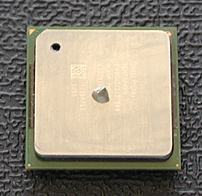 looks easy enough right? Let's hope it never gets to that. i have another hard drive in transit right now (paid for with the RMA money from my sound card [because it didn't work because of the pci problem {and i would rather have another hard drive than a better sound card than what came on the board}]) so i can do a fresh install of the os without disrupting my current install - because once the wife starts using windows and customizing everything again she's not happy when all her pretty changes go away. With a second hard drive with a clean install of XP available i'll be able to run a gambit of tests and reformat at will. Eventually i even want to have a seperate gaming OS installed with none of the useless junk i usually install running in the background. this is probably overkill, but i like overkill.
 I’ve been kind of heavy on computer posts lately and I apologize. The problem is that the computer has found a way into my brain. When I don’t have it apart on the floor of my living room I’m taking it apart on the floor of my brain. My thumbs are all worn out from thumb screws and my eyes are blurry from lack of sleep and red LED’s.
 at 7:45 i started checking connections and cables while preparing for the boot. around 8:15 the first boot occurred. at this point everything was going as expected. once i began installing windows i noticed a problem. when the computer attempted to reboot it would hang before posting again. the power button and reset button was non-responsive so the only way i could get the computer to restart was to kill the power at the power supply.
  ignoring the pci problem for now, i moved on to installing the VGA drivers so i could test its performance with a game. when installing the VGA driver my computer crashed half way through the install. i attempted the install about five more times with a crash at the exact same time.
  at this point it's 11:30 p.m. on day two. i load up the bios and after some testing discover a pci/pcix VGA boot order setting. i change the setting to pcix and the system now seems to reboot as expected. i'm not 100% convinced that this is what fixed the rebooting problem but at least it is fixed now.
 finally as i tried to save some of my benchmarks to my flash drive i noticed that my usb ports on the front of the case are not working.
 The story talks about software piracy as almost a right of passage. As kids, we went out and downloaded $1000 programs and got to explore the wonders of tech through the coolness of photoshop and other apps. As adults we have the resources to buy the programs when we're too lazy to go through all the effort to download and crack them. So, in a sense, piracy is like a beta preview of software. Sure it might work but it'll probably be buggy and take a lot of effort. So, as adults, if we like it we'll keep using it and that usually means shelling over the cash. Nice ideas, even though this is probably too sketchy for large bloated corporations. They don't realize that without the accessibility of software provided by piracy the computer industry would probably not resemble what it is today.
 think the
  even
even  Anyway, here's the point. I think the weather channel is trying to break us down
  I say come on, just pull out the crystal ball and stop beating around the bush. we'll still tune in on the 8's every single day while we slurp down another bowl of

 This argument is the crux of my computer crisis. AMD is fast, good for gaming and just has that underdog edge to it. Intel is safe, stable and every computer I've had up until now has run just fine using an Intel chipset and processor. However, Intel has a weakness; several weaknesses actually. Their Prescott line of chips (the current line) is notorious for operating at high temperatures making the inside of your computer hotter and possibly leading to stability problems. The newest Intel motherboards also require a new type of ram, DDR2. This ram is more expensive because it is new and its speeds are similar to regular DDR. Finally, the Intel processor itself is expensive and the only version that would fit into my computer budget is not 64 bit compatible.
 Considering these factors the first part of my crisis is over, I'm going to throw caution into my cooler master case fans and walk down the AMD path again.
 taking a break from my computer build posts i decided it was time to explain my blogger address is
  Harvey played a character called eric von zipper in a collection of b-movies from the 60's. These movies include


 i'm currently in the process of building a "sweet new machine" using components ordered from the greatest computer store on the planet,
  i teamed up the AMD 64 with an
  fans of neil stephenson's
 Update: I will probably never get the CSS right but who wants a polished, complete blog anyway? That just makes people feel bad about their blog and their life. Nothing should be complete, it should always be evolving. So deal with the messed up banner and mostly sock graphics of this blog. It represents me quite nicely.
 yesterday i revealed that most of my mornings start with ESPN and sportscenter. i did this in a roundabout kind of way, but it was revealed nonetheless. so to continue my efforts to create a thriving population of eric-like replicas we go to the next highlight of my morning, the
  what was sports before ESPN? something you read about in the paper. something you endured the evening news for, waiting for a highlight squeezed between weather and shootings. something you mortgaged your house for just to sit forty stories above the field and hope to catch a glimpse of something while drinking the most expensive water on the planet. but damn, it was worth it.
 People knew where they were the entire time. so what's the big deal? growing up we would have called this an adventure. hell, throw in a case of corona and you have a commercial.
 could this be the same guy who use to lead the industrial music movement? the guy who discovered marilyn manson? a guy wearing a white blouse and smiling like he just found a bottle of viagra behind a toilet in the ladies bathroom.
